Download
Pricing

Free while it is being built. Priced like a tool after.

Scena Studio is free during the Open Test. At the start of the test, Scena Studio covers shared API use on services where shared access is enabled. Once shared access ends, you must use your own API keys for AI generation. Paid plans are previews until the signed build ships.

Updated 3 Nov 2026 · paid plans are proposed until the signed build
Open test · running now

Free Open Test with no usage quota from Scena Studio

At the start of the Open Test, Scena Studio covers shared API use on enabled services and sets no per-user quota for generations or credits on shared keys. Provider rate limits and availability apply. You can use your own key during the test and must use it once shared access ends. Your provider may charge for usage on your own key. Scena Studio asks for no payment card.
What you get A free licence key for the whole open test Free shared API access at the start of the Open Test on enabled services Use the models and features available in your build A free Studio lifetime key once you have sent back one usable report
What is asked of you Join the testers’ group — Telegram, Facebook, WhatsApp or Discord, whichever you already use When something breaks, say so: Help → Report a bug in the app, or a post in the group. The log goes with it Use shared access responsibly and follow the service provider’s terms. Scena Studio sets no per-user quota on shared use
Scena Studio does not charge for the Open Test or automatically move you to a paid plan. Once shared access ends, you must use your own API keys for AI generation. Your provider may charge for that usage.

Three plans, three ways to pay

Free for a first episode, Creator for one channel, Studio for several. Pay by the month, the year, or once. AI usage is separate and billed by the services themselves.
Free No card needed

For trying it on a first episode

Make one whole episode on your own keys and see if the workflow fits, before you pay anything.

$0 forever · one PC No card, and no time limit.
Download Free — $0
What you get
All 39 AI services & 80+ models, on your keys13 video, 12 image, 4 gateways, voice/lip-sync & custom REST at raw API price. No markup. The main working screensStudio, storyboard, both queues and export. One episode, 20 jobs per runEnough to finish a first episode in a few runs. 3 reference locksYour main characters keep the same face from shot to shot. Consistency check, 20 clips a monthFace, outfit and palette scored on your own GPU. Short-clip auto-stitcher (up to 20 clips)Stitch 5s–8s clips into 16:9 or 9:16 MP4 with −14 LUFS audio. Pre-queue TM & copyright warningFlags trademarked terms in prompts before spending API credits. 2× local GPU upscale & commercial rightsZero watermark and 100% yours to monetize on YouTube & Meta.
Move up when an episode needs more than 20 shots in one run, or a second episode is waiting.
Creator Recommended for most channels

For one channel, every week

One person posting on a schedule: whole episodes queued in one go, every shot checked, no limits on the work.

$96/ year billed yearly · $8 a month · one PC $48 less than paying monthly.
Choose Creator Yearly — $96 / yr
Everything in Free, plus
No caps on episodes or jobsQueue a whole 50-shot episode in one run and walk away. 4 parallel jobs per serviceA long queue finishes up to 4× sooner. Unlimited locks and BLOCK rulesA wrong outfit or a missing prop stops the job before it costs money. Every clip checkedConsistency check with no monthly limit. Change service mid-queueMove jobs to another model when one is slow or down. Settings kept. Dialogue and lip-syncA voice per line, timed against the shot. Upscaling up to 4×On your own GPU. No per-image fee. Unlimited auto-stitch, TM BLOCK & 15-lang dubsAuto-stitch 50+ clips at −14 LUFS, block TM risks, and dub into 15 languages.
Move up when you run several channels, or want the queue to keep going overnight.
Studio For scale and small teams

For several channels or a small team

Big queues that run unattended: accounts take over from each other, jobs run side by side, and one licence covers three PCs.

$240/ year billed yearly · $20 a month · 3 PCs $108 less than paying monthly.
Choose Studio Yearly — $240 / yr
Everything in Creator, plus
Unlimited parallel jobsAs fast as your keys and accounts allow. Account failover and key rotationWhen a key runs dry the next account takes over, so the queue keeps going overnight. Webhook and local APIYour own scripts push jobs in and read status out. Upscaling up to 8×, face restoreBig enough for 4K delivery, with faces repaired. Three PCs on one licenceAbout $6.67 per PC a month on yearly. Three machines, or three people. Priority help and early buildsAn answer within one working day, and new versions before release. Multi-channel batch dubbing & custom TM rulesExport 16:9 YouTube + 9:16 Meta Reels cuts with shared team brand-safety rules. Hardware DPAPI key pool & 4-state shot freezePool encrypted API keys and lock Approved shots across 3 workstations.
Made for two or more channels, a small team, or a PC that renders all night.
View plan diagrams
Free Plan 2D Workflow — 39 AI Services (80+ Models), 1 Episode Queue, 3 Reference Locks Creator Plan 2D Workflow — Unlimited Queue, 4x Parallel Speed, Lip-Sync & 4x Upscale Studio Plan 2D Workflow — 3 PC Seats, Auto Key Failover, 8x 4K Upscale & Webhook API
Open-test accounts that send back one usable report keep a Studio lifetime key, free. How to report

Compare the plans

Every plan runs every service on your own keys. The difference is how much you can run at once, and how much runs without you.

Swipe or scroll sideways to compare all three plans.

Feature Free $0 Creator $96 / yr Studio $240 / yr
Make the video and the stills
All 39 AI services (13 video, 12 image, 4 gateways, audio & custom REST), on your own keys
Episodes open at once 1 Unlimited Unlimited
Jobs per queue run 20 Unlimited Unlimited
Parallel jobs per service 1 4 Unlimited
Keep it the same show
Reference locks (NOAH, 12SCH…) 3 Unlimited Unlimited
Continuity rules Warn only Warn and BLOCK Warn and BLOCK
Consistency check on your GPU 20 clips a month Unlimited Unlimited
Approvals and freeze
Pre-queue Trademark (TM) & IP scanner Warn only Warn and BLOCK Warn, BLOCK & custom rules
Run it at scale
Resumable queue and retries
Change service mid-queue
Account failover and key rotation
Webhook and local API
Finish and hand over
Export at 16:9, 9:16 and 1:1
Local upscaling 2× Up to 4× Up to 8×, face restore
Dialogue and lip-sync staging
Short-clip auto-stitcher (5s–8s) & −14 LUFS audio
Multi-language dubbing & burned-in subtitles 15 languages 15 languages, batch channels
Licence and help
PCs per licence 1 1 3
Billing cycle & renewal Forever ($0) $96 / yr · cancel any time $240 / yr · cancel any time
Cost per PC seat $0 / PC $8.00 / mo per PC $6.67 / mo per PC
Commercial use of what you render
Updates Every 1.x Every 1.x Every 1.x, early builds
Help Community In the group, within 2 days Priority, within 1 working day
How the numbers were set These prices are proposed, not final. They become final when the signed build ships, and are published here first.
Creator$8 a month on the yearly plan: below every platform’s monthly entry price in the comparison below. Studioabout two and a half Creator licences, for three PCs and the features that run a queue unattended. Lifetimeabout two years of the yearly price. The same range other own-key desktop tools charge once.

How it compares to what is on the market

Video platforms sell credits: the price includes the generation, and the plan runs out after a few dozen clips. Scena Studio sells the tool. You pay each service at its API price with no clip cap, and the licence costs about what a platform’s entry plan does.

Cheapest paid plan, per month
Scena Studio Creator, yearlythe tool only · your keys, no clip cap $8
Krea Basicselected video models only $9
Kling Standardabout 660 credits, around 22 short clips $10
Scena Studio Creator, monthlythe tool only · cancel any time $12
OpenArt Starter4,000 credits a month $14
Higgsfield Starter200 credits a month $15
Runway Standardcredits spent per second of video $15
LTX Studio Litepersonal use only; commercial from $35 $15
Desktop tools that also run on your own keys
VideoAIStudiofive studios, one-time unlock $199 once
Hooked Studioshort-form app, launch price (list $199) $89 once
Scena Studio Creatorepisodes, locks, consistency check · 1 PC $199 once
Scena Studio Studio3 PCs, multi-key failover, local API $449 once
Own-key tools charge once for the software and nothing for the generation. Scena Studio’s lifetime price sits in the same range.

Prices from public pricing summaries checked on 3 Nov 2026, monthly billing unless marked. Some platforms are cheaper billed yearly (Krea Basic is $5 a month that way). Platform plans include generation credits; Scena Studio’s price does not, because the services bill your key. Prices change often, so check each site before you compare.

Sources KlingKreaOpenArtHiggsfieldRunwayLTX StudioVideoAIStudioHooked Studio

What you pay the AI services, and what you don’t pay us

Whenever you use your own API key, the provider charges its published API rate. Scena Studio adds no markup. The app estimates the cost before you run a job and records it after the job finishes.
Who bills youEach service you use, on the key you gave it. Kling bills for Kling, Veo for Veo.
At what priceTheir published API price, which is lower than their web app price for every service we support.
What we addNothing. The licence is the only money that reaches this project.
Before you spendThe queue estimate sits in the status bar before you press RUN; the session total climbs while it works.
A worked example One 46-shot episode, at the rates the app holds today
31 shots · Kling 4.0 Pro · 8 s$11.20
9 shots · Veo 3.1 · 8 s$4.95
6 shots · MiniMax H3 · 6 s$1.45
Upscale, checks, storage$0.00
Episode total$17.60
Illustrative: the EE012 sample episode at the per-second rates in the app’s own service table. Prices change; the app reads the current one before each run. This estimate applies when you use your own keys. Scena Studio covers calls made through enabled shared keys at the start of the Open Test.
Episode Economics & Monetization Payback

What one 60-shot episode actually costs on raw API keys vs. what it earns on YouTube YPP & Meta Reels

Because Scena Studio adds 0% markup to your API keys, runs ArcFace & 4K Real-ESRGAN upscaling for free on your local GPU, and auto-stitches short clips with pre-flight Trademark/Copyright scanning, a single monetized episode typically pays for an entire month of API usage:
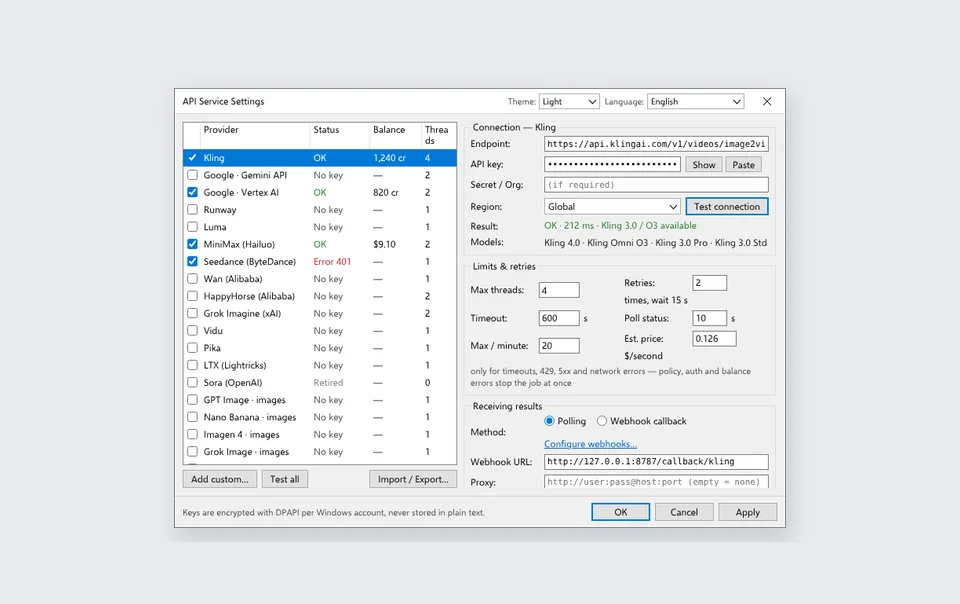
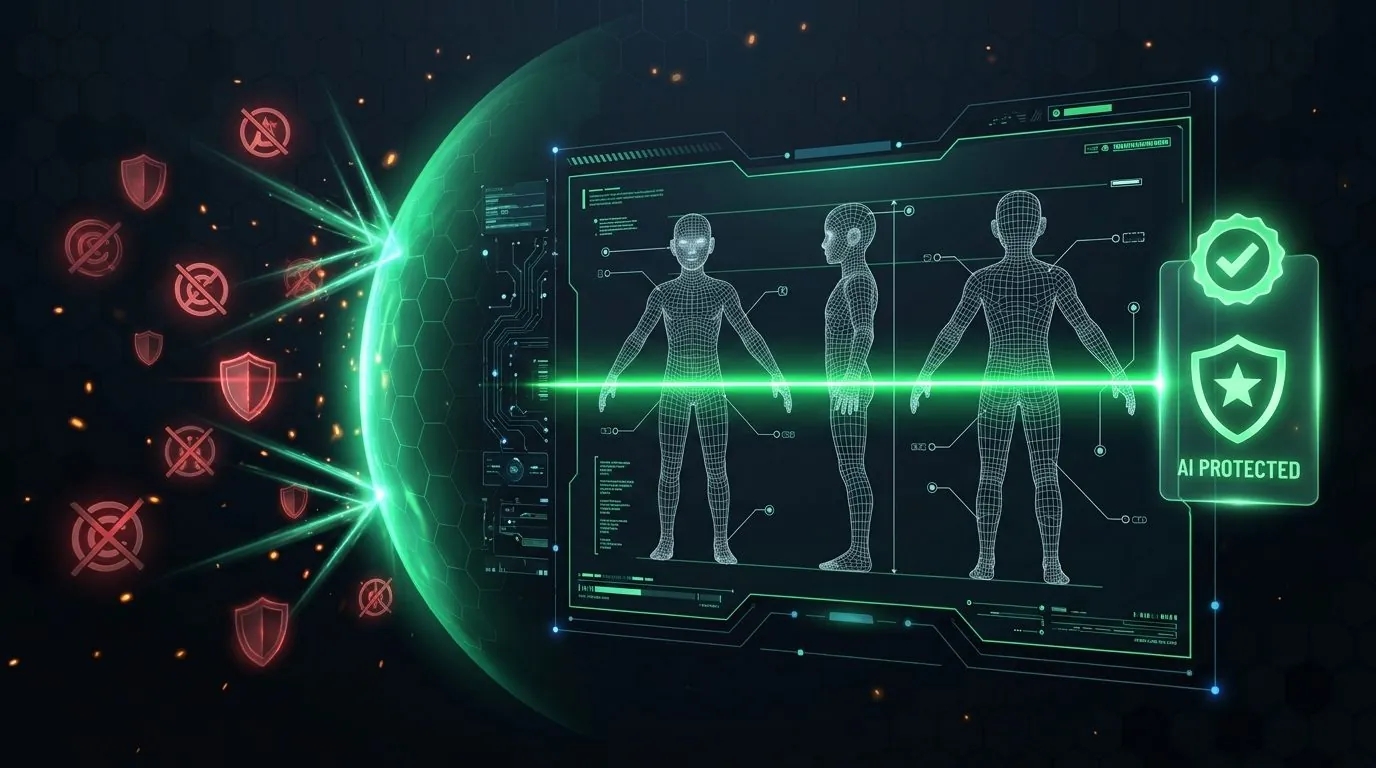
BYOK API Services configuration screen with zero markup TM and Copyright Pre-Flight Shield protecting channel revenue Dual 16:9 YouTube and 9:16 Meta Reels export
Episode Format (60 shots / 5–8 mins) Web Credit Wrappers Cost Scena Studio BYOK API Cost Local GPU Tasks ($0 API) Typical YouTube YPP + Meta Reels Benchmark
Kids 3D Educational Cartoon $42.00 – $68.00 $4.82 (Seedance + Kling + Veo) ArcFace check, 4K upscale, FFmpeg stitch, TM scan RPM $5.80–$7.40 · 1,000 views covers full API cost
Cinematic Lore / Sci-Fi Series $55.00 – $92.00 $6.15 (Kling 4.0 + Veo 3.1 + Hailuo) Last-frame continuity, 9:16 Reels cut, TM scan RPM $8.20–$11.50 + Meta Reels Ads bonus

The short questions

Will my test account be charged when the beta ends? Scena Studio does not charge you automatically when Open Test ends. You must use your own API keys for AI generation once shared access ends. Providers may charge for usage on your own keys, including during the test.
Can I buy a licence now? Not yet, and that is on purpose. Nothing is sold until the signed build ships. Until then the open test is the only tier.
What exactly earns the lifetime key? One usable report: a bug, a crash log, a service that behaves oddly, a feature that is missing. Sent through the app or the group, from an account that actually rendered something. It is a Studio lifetime key: three PCs, every 1.x release.
Is a plan the app, or credits? The app. There are no credits to buy here. Once shared access ends, AI generation requires your own API keys and may incur charges from the provider.
Can I move the licence to a new PC? Yourself, twice a month, from the Licence screen. No ticket needed. Studio covers three PCs at once.
What about refunds? Within 14 days of a paid licence, one message, no questions. The exact terms are on the legal page.