Scena Studio for Windows
One installer with .NET 10 included. At the start of the Open Test, shared API access is free on enabled services. Add your own key to use AI generation once shared access ends. Scena Studio does not resell credits.
Windows 11, 64-bit detected. This is the right build.
Download the installer
scena-studio-1.1.0-setup.exe
50.8 MB · updated 6 Nov 2026 · Windows 10 / 11, 64-bit
By downloading you accept the licence and the terms: Free plan, one PC, commercial use allowed. No other software is installed with it. Read the licence · What the installer doesPublished by Scena Studio LLC · Founder & Lead Architect Alex Mercer answers directly in the community group.
The illustrated setup guide: every screen, with a screenshot
Portable ZIP45.1 MB · no installer, runs from a folder
MSI for IT deployment45.2 MB · silent install, per-machine
Verify what you downloaded (MD5 & SHA-256)
✓ MD5 & SHA-256 VERIFIED
Optional, and it takes five seconds. Run either command in PowerShell in your Downloads folder and compare the result with the MD5 or SHA-256 for your file.
Get-FileHash .\scena-studio-1.1.0-setup.exe -Algorithm MD5Get-FileHash .\scena-studio-1.1.0-setup.exe -Algorithm SHA256 scena-studio-1.1.0-setup.exe (50.8 MB)
MD5: 42fd1fb12135febdc092c67bd767d0b4 · SHA-256: 92bb0dbbb532e5fe45b5e194cc3be9479b119519e6eb5deb8131822eafed0b69 scena-studio-1.1.0-portable.zip (45.1 MB)
MD5: c5c29793297d1998179e48f1a33669ed · SHA-256: 59073369d41c0a248d7081d64a34a305520cee1fb7620ca925fe81132ba71a13 scena-studio-1.1.0.msi (45.2 MB)
MD5: 8f8434c70fc05e72c6192eb2b49e6913 · SHA-256: c60e074ba9796d9e0931c8fb87bf7029e75593789671db685a8b4983f49adc27 ✓ Live download stream ready — click any download button above to verify & report live MD5 + SHA-256 Every build is scanned on VirusTotal before release, with every engine listed by name. Open the report for this build
System requirements
OSWindows 10 21H2 or Windows 11, 64-bit
Runtime.NET 10 — bundled, nothing to install
Memory8 GB, 16 GB for local upscaling
GPUOptional · any Vulkan GPU speeds up upscale and checks
Disk500 MB, plus room for your episodes
Languages12 interface languages, Vietnamese included
Windows only
Scena Studio is a native WinForms application. There is no macOS or Linux build, and none is planned for the 1.x line.
On a Mac it runs under Parallels or any Windows VM, but local upscaling and the consistency check want a real GPU, so expect them to be slow.
Pre-install security & clean-system guarantee0 / 72 VIRUSTOTAL
✓ 0 / 72 Antivirus Engines: Clean across Microsoft Defender, Kaspersky, Bitdefender, CrowdStrike & ESET.✓ Zero Background Daemons: No auto-start service, no kernel driver, no browser extension.✓ Local DPAPI Key Vault: API keys stay encrypted in %APPDATA%\ScenaStudio on your PC.✓ 1-Click Clean Uninstall: Standard Windows Settings uninstaller leaves your episode folders untouched.
Two ways in, and what Windows will say the first time.
The installer is the short route. The portable ZIP is for a USB stick, a locked-down work PC, or keeping two versions side by side.
Select an image to enlarge it and browse the steps in that guide.
Installer
Recommended
About a minute. Puts Scena Studio in Program Files with a Start-menu entry. New builds are offered, never installed without asking.
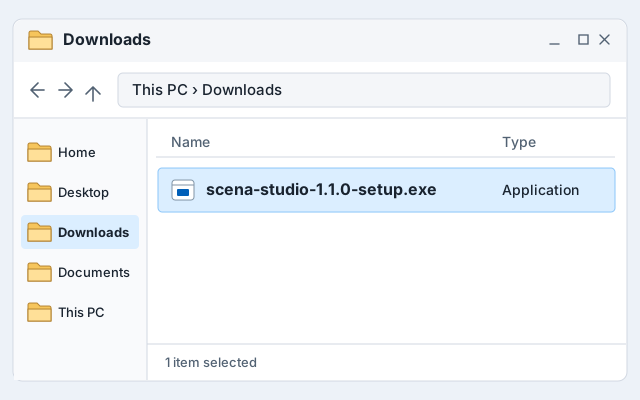 Open the downloaded installer
Once the download completes, open scena-studio-1.1.0-setup.exe (50.8 MB) from your browser’s download tray or your Downloads folder.
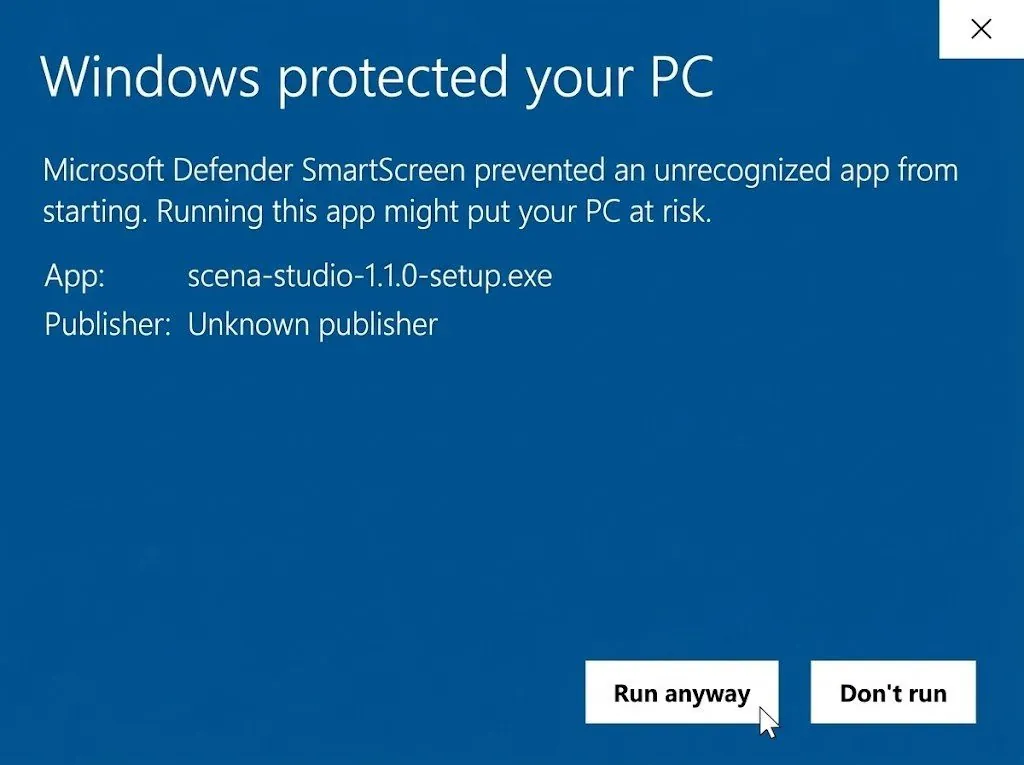
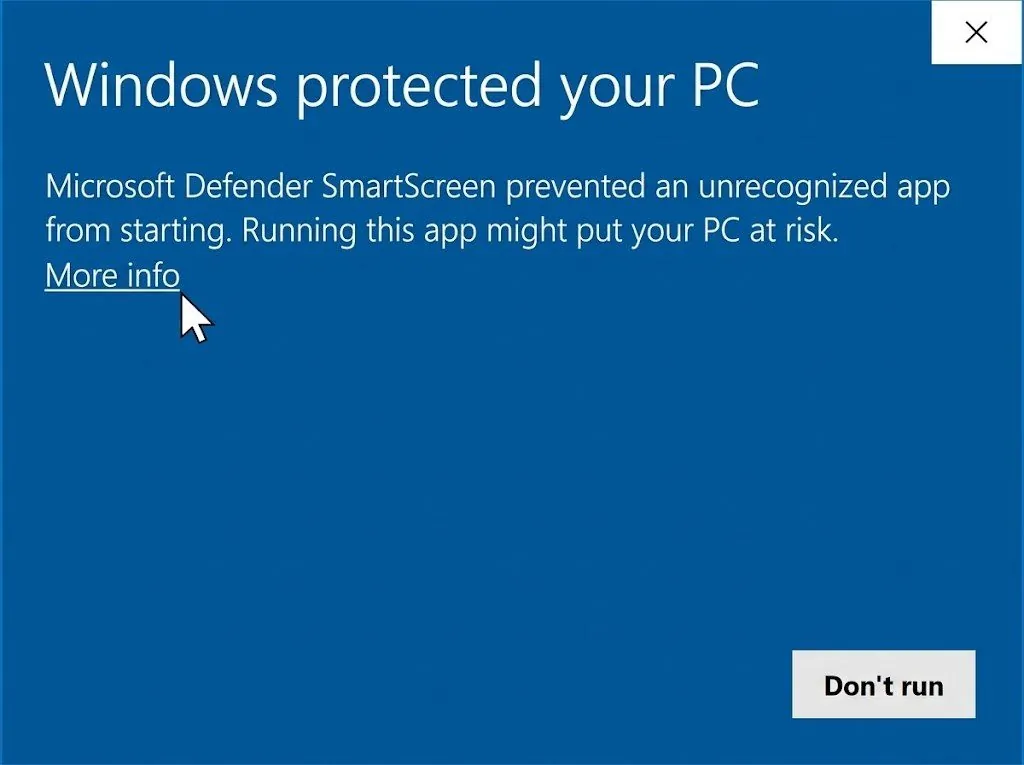 Review the Windows SmartScreen prompt (EV certificate pending)
Our Extended Validation (EV) Code Signing certificate (Scena Studio LLC) is registered and currently in the final CA hardware-token issuance queue. While EV activation completes, follow the 3-step guide below (More info → Run anyway) after verifying the SHA-256 / MD5 hash.
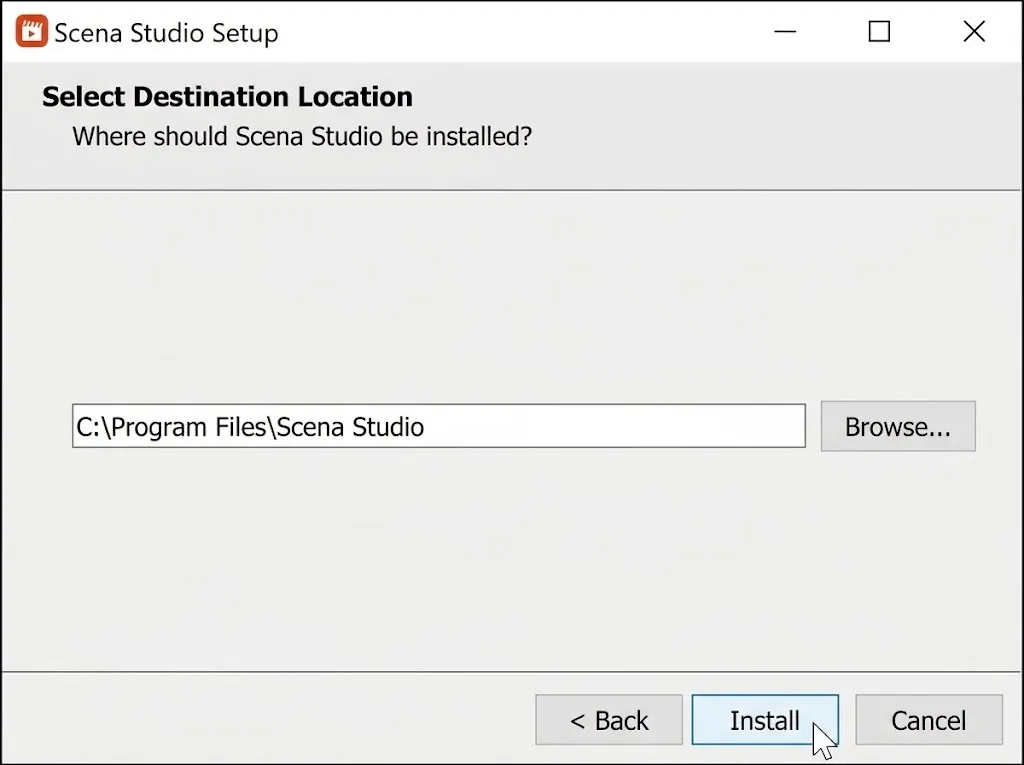 Pick a folder, then Install
The default is fine. .NET 10 is already inside the installer, so nothing else is downloaded.
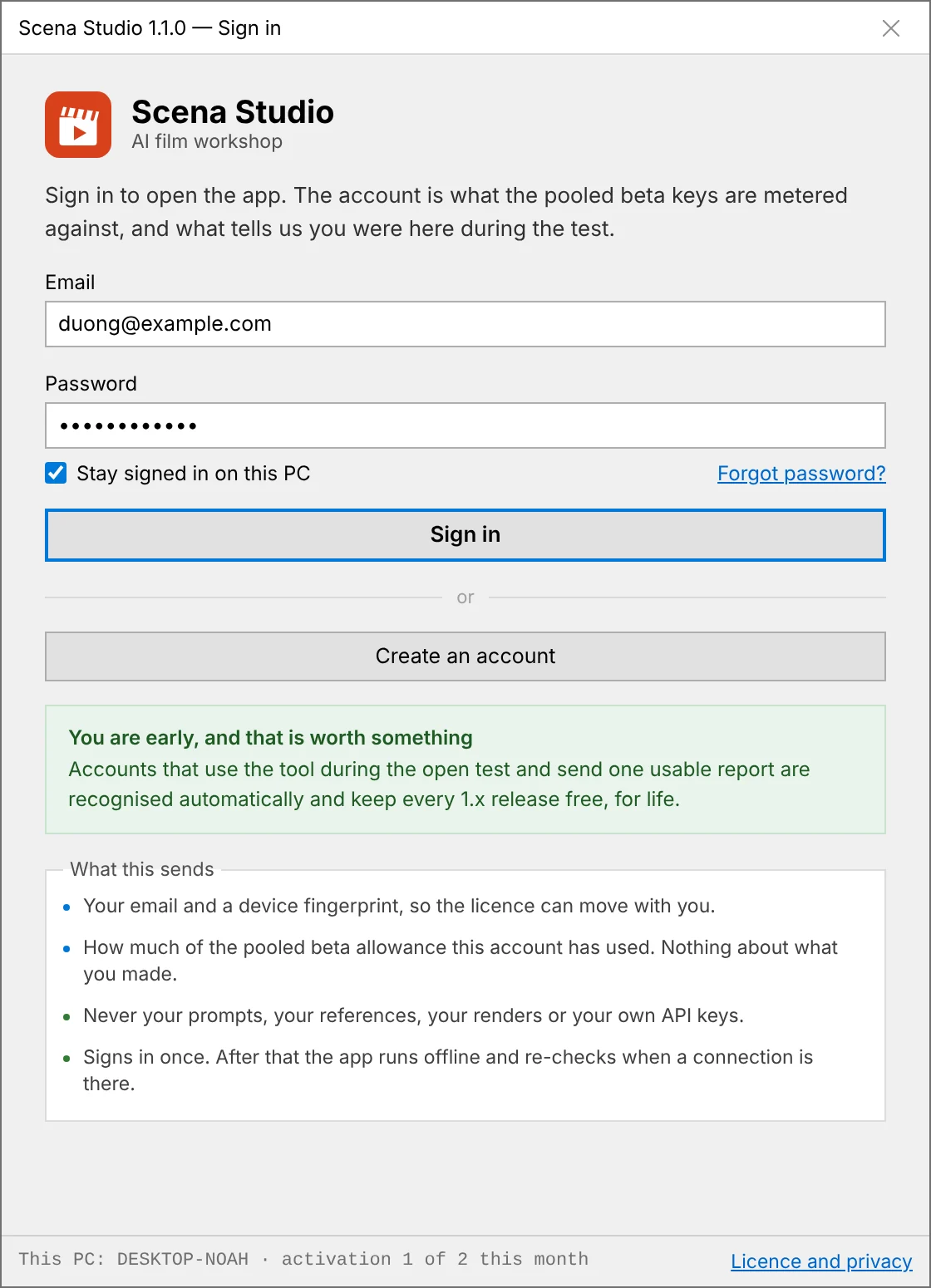 Sign in
First launch asks for an email and a password. No account yet? Create one on that screen: a six-digit code goes to your email and the app opens once you type it in. There is no charge to join the Open Test. Your provider bills usage on your own API key.
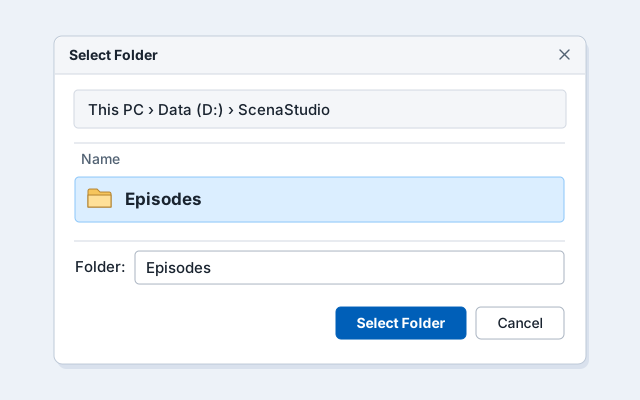 Choose where episodes live
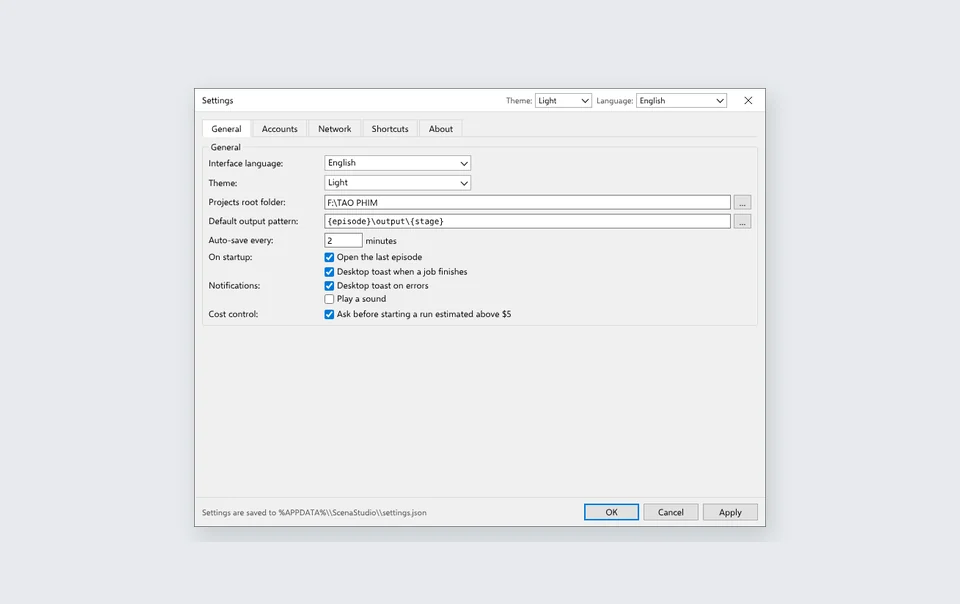
Right after sign-in, point it at a drive with room — renders add up fast. You can move it later in Settings.
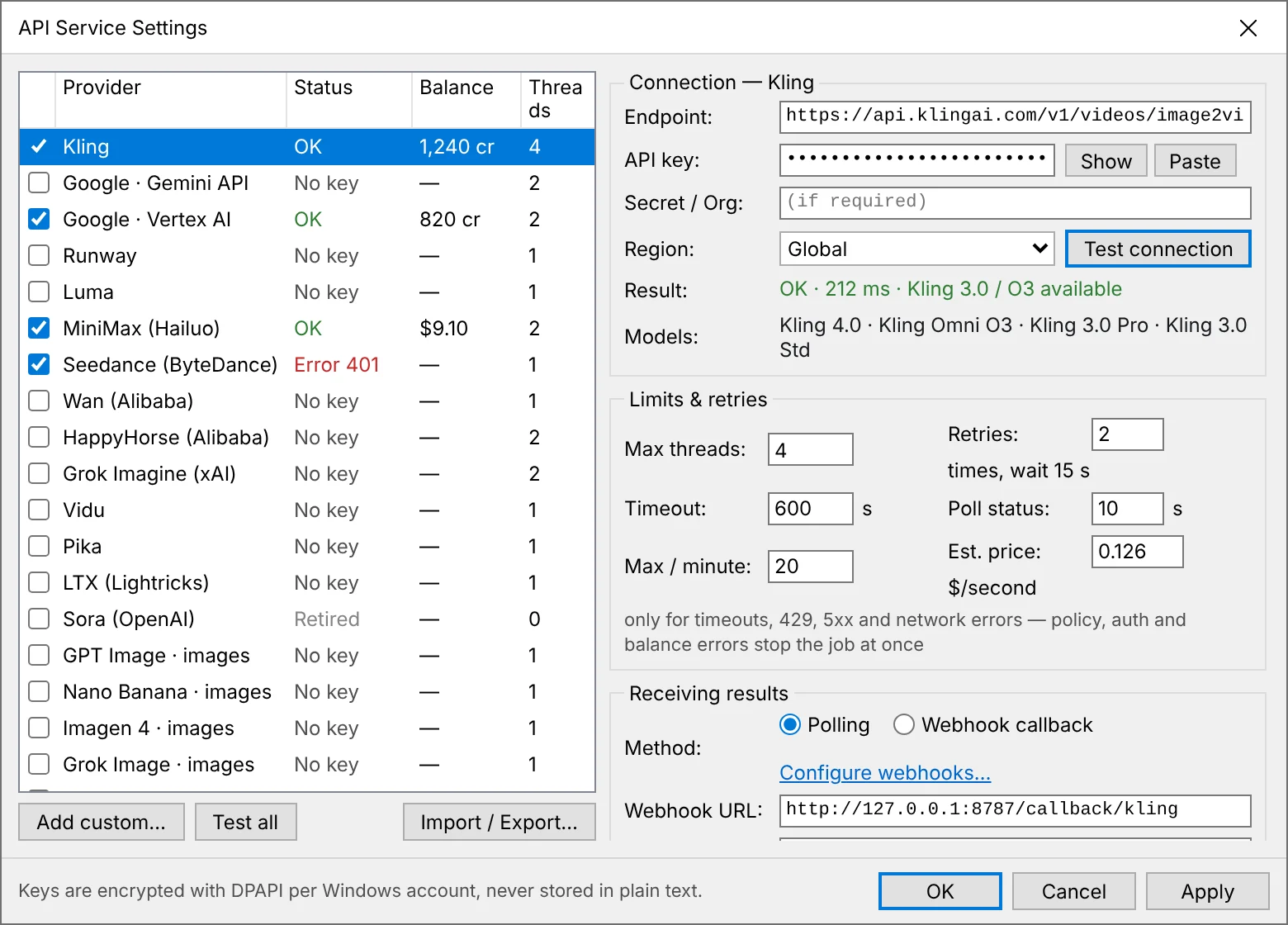 Open Tools → API services
Check whether your build has a shared test key for the model you chose. If needed, add your own key and test it. Your provider bills work run on that key.
Open the downloaded installer
Once the download completes, open scena-studio-1.1.0-setup.exe (50.8 MB) from your browser’s download tray or your Downloads folder.
Review the Windows SmartScreen prompt (EV certificate pending)
Our Extended Validation (EV) Code Signing certificate (Scena Studio LLC) is registered and currently in the final CA hardware-token issuance queue. While EV activation completes, follow the 3-step guide below (More info → Run anyway) after verifying the SHA-256 / MD5 hash.
Pick a folder, then Install
The default is fine. .NET 10 is already inside the installer, so nothing else is downloaded.
Sign in
First launch asks for an email and a password. No account yet? Create one on that screen: a six-digit code goes to your email and the app opens once you type it in. There is no charge to join the Open Test. Your provider bills usage on your own API key.
Choose where episodes live
Right after sign-in, point it at a drive with room — renders add up fast. You can move it later in Settings.
Open Tools → API services
Check whether your build has a shared test key for the model you chose. If needed, add your own key and test it. Your provider bills work run on that key.
Portable ZIP
Nothing is written outside the folder you extract to. No admin rights, no registry, no Start-menu entry.
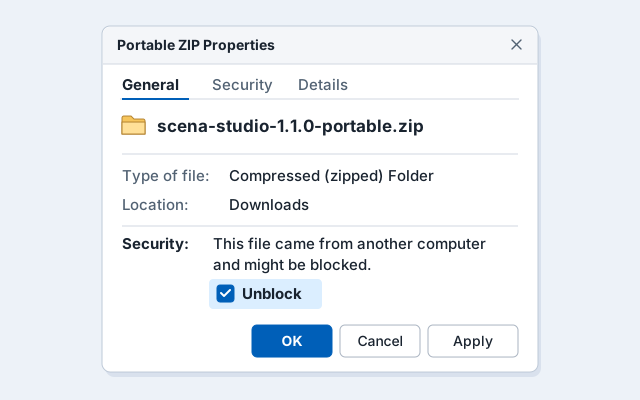 Unblock the ZIP before extracting
Right-click the file → Properties → tick Unblock at the bottom → OK. Windows marks every downloaded archive, and skipping this makes the app look broken.
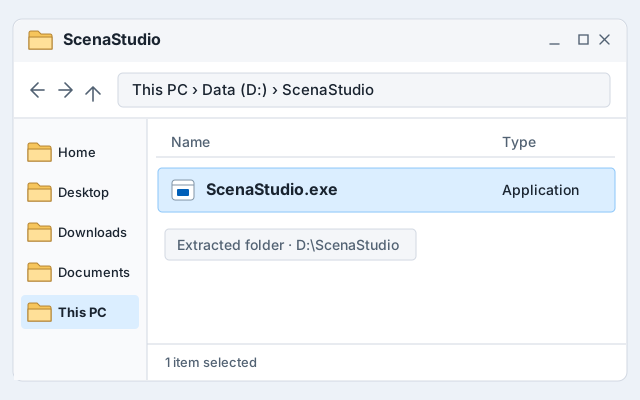
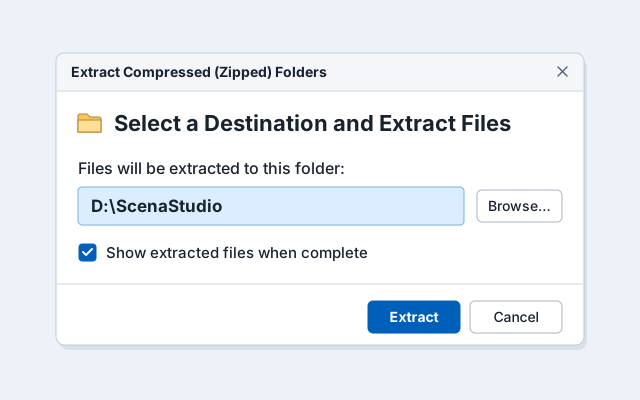 Extract the whole folder
Right-click → Extract All, or use 7-Zip. Pick a normal folder such as D:\ScenaStudio — not Program Files, and not inside the ZIP viewer.
 Do not run it from inside the ZIP
Double-clicking the .exe while still in the archive starts it in a temp folder, so settings and episodes vanish on restart.
Run ScenaStudio.exe
Same SmartScreen box as the installer, same three clicks, then the same sign-in. Right-click → Pin to taskbar if you want it handy.
 Updating
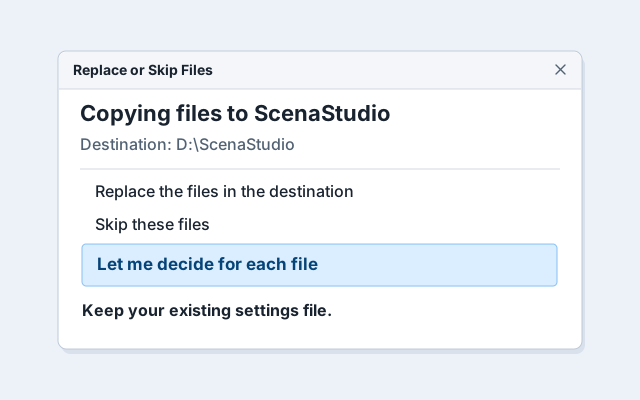
Extract the new ZIP over the old folder and keep your settings file. The portable build does not update itself.
Unblock the ZIP before extracting
Right-click the file → Properties → tick Unblock at the bottom → OK. Windows marks every downloaded archive, and skipping this makes the app look broken.
Extract the whole folder
Right-click → Extract All, or use 7-Zip. Pick a normal folder such as D:\ScenaStudio — not Program Files, and not inside the ZIP viewer.
Do not run it from inside the ZIP
Double-clicking the .exe while still in the archive starts it in a temp folder, so settings and episodes vanish on restart.
Run ScenaStudio.exe
Same SmartScreen box as the installer, same three clicks, then the same sign-in. Right-click → Pin to taskbar if you want it handy.
Updating
Extract the new ZIP over the old folder and keep your settings file. The portable build does not update itself.
EV Code Signing registration in progress · Setup guide
EV SIGNING PENDING
EV certificate registered & awaiting final hardware token issuance.
 MORE INFO → RUN ANYWAY
Follow the 3-click setup guide below to launch the installer.
 0/72 & HASH VERIFIED
0/72 VirusTotal clean and verifiable via MD5 & SHA-256 checksums.
Why Windows shows “Windows protected your PC” while our EV certificate is pending — and how to install in 3 clicks.
EV Certificate Status (Scena Studio LLC): We have registered for an Extended Validation (EV) Code Signing Certificate and are currently waiting for final Certificate Authority (CA) corporate vetting and hardware HSM token delivery. While our EV signature is in this waiting period, Windows Defender SmartScreen displays a standard reputation screen on first launch. The installer is 100% clean (0 / 72 on VirusTotal) — please follow the 4 steps below to set up safely.
EV SIGNING PENDING
EV certificate registered & awaiting final hardware token issuance.
MORE INFO → RUN ANYWAY
Follow the 3-click setup guide below to launch the installer.
0/72 & HASH VERIFIED
0/72 VirusTotal clean and verifiable via MD5 & SHA-256 checksums.
Never turn SmartScreen or Windows Security off. Instead, verify the MD5 / SHA-256 checksum and follow these steps to complete setup while our EV certificate is being finalized:
Click “More info” on the blue SmartScreen window Because our EV Code Signing certificate is still in the pending issuance queue, Windows shows “Windows protected your PC”. Click the underlined More info link (marked 1 in the screenshot). Confirm the file name and MD5 / SHA-256 hash Verify the app name reads scena-studio-1.1.0-setup.exe (marked 2) and matches the MD5 (42fd1fb12135febdc092c67bd767d0b4) or SHA-256 hash printed on this page. Click “Run anyway” to open the installer Select Run anyway (marked 3) in the expanded dialog. Windows remembers your decision for this build on your PC. Approve User Account Control (UAC) & click Install Click Yes on the standard Windows UAC prompt to install into C:\Program Files\Scena Studio, then sign in to start creating.Get-FileHash .\scena-studio-1.1.0-setup.exe -Algorithm SHA256
72-engine antivirus verification
Every release is verified clean (0/72) across Microsoft Defender, Kaspersky, Bitdefender, and CrowdStrike before publication. Always keep your antivirus active and verify the SHA-256 hash above.
In-place version updates
New builds install cleanly over your existing version while keeping your local episode folders, settings, and encrypted API keys intact. Updates are never installed without your consent.
Removing it
Settings → Apps → Scena Studio → Uninstall removes the program, the Start-menu entry and the update task. Your episodes, settings and keys stay until you delete them.
What it connects toFour places, nothing else. Watch it with any firewall.
Scena Studio on your PC
No analytics. No crash reporter that phones home.
Sign-in server
when you open the app
The AI services you pick
each shot only to its own service
Update check
on launch
Bug report
only when you press Send
Version 1.1.0 — 6 November 2026
NEW
39 AI Services & 80+ Models + Custom REST/OpenAI/fal/Replicate Provider attachment (AddProviderDialog).
NEW
Hybrid Consistency Check — local GPU scoring ($0) plus optional Cloud Vision AI Inspector (Gemini 2.5 Flash, Claude Sonnet 4.5, GPT-4o-mini).
NEW
Multi-project queue sidebar (QueueProjects), native 3-step Setup Wizard with System Readiness Preflight, and IT MSI installer.
NEW
Local Real-ESRGAN 4K image upscale with face restore + Topaz Video Upscale (2×–4×) & 4K Lip-sync (sync-lipsync 2, Hedra Character 3).
FIX
Patched all 10 tool dialogs to be resizable & maximizable with DPI-safe layout at 125%/150% scaling, plus automatic queue resume after key swap.
Read the full changelog →
Previous versions
Older builds stay available so a project mid-episode is never forced to update. Each one keeps its own settings folder.What gets unlocked on your PC the moment you install
1. Character Lock (`ArcFace ≥ 0.85`)
Keep faces, outfits & voices identical across 60 shots on Veo 3.1, Kling 4.0 & Seedance 2.5.
2. Short-Clip Auto-Stitcher
Chains Last-Frame → First-Frame across 5–8s clips and renders a 24fps master MP4 via FFmpeg.
3. Pre-Flight TM & Copyright Shield
Scans frames for accidental brand logos & watermarks before YouTube YPP or Meta Reels upload.
4. Bring your own key or use an available shared test key
Shared API access is free at the start of the Open Test on enabled services. Once it ends, use your own keys. Your provider may charge for that usage. Scena Studio protects keys with Windows DPAPI.