How to make an AI animated series for YouTube (and actually get monetized in 2026)
Uploading random AI clips with robotic TTS no longer passes YouTube Partner Program (YPP) review. Channels that earn $5.40–$8.60 RPM on YouTube and $1,500+/month on Meta Reels treat AI as an animation production line: a permanent Series Bible, a recurring cast that never drifts, automated 5s–8s clip stitching at −14 LUFS, and pre-flight Trademark (TM) & Copyright clearance before every upload.
 Alex MercerMaker of Scena Studio · AI Series Director
Updated
17 min read
Read in Vietnamese
Based on production logs and real YPP/Meta monetization analytics across 10 consecutive episodes (November 2026).
Short answer (Executive Summary): To build an AI animated YouTube channel that passes 2026 YPP review and scales to Episode 10 without burnout, lock a permanent Series Bible (3 to 5 recurring characters with front/3-quarter reference plates and 4 recurring locations), write episodic scripts broken into 45–60 structured camera beats, batch-render overnight on Scena Studio using Kling 4.0 and Veo 3.1, auto-stitch the 5s–8s clips with Last-Frame continuity and −14 LUFS dialogue normalization, run the built-in Trademark (TM) & Copyright scanner to guarantee 0% IP claims, and export both 16:9 and 9:16 masters.
1. What YouTube's 2026 'Inauthentic & Repetitive Content' policy actually requires from AI channels
Every week, creators ask: can AI videos be monetized on YouTube in 2026? The answer from official YouTube Partner Program (YPP) documentation and real channel audits is a clear yes—provided your videos demonstrate structured human direction and serialized narrative continuity.
YouTube's July 2025 and 2026 monetization updates specifically target mass-produced spam: channels that scrape Reddit stories or Wikipedia articles, slap a single static voiceover on top of morphing, disconnected 4-second AI stock clips, and upload 5 videos a day. When a human YPP reviewer opens your channel for monetization approval, they check four concrete production signals:
- Visual Cast & World Continuity: Do the named characters (e.g., Noah, Emily, Aria) keep the exact same face, proportions, and outfits from the opening hook to the final scene, and across Episode 1 to Episode 10?
- Intentional Shot Editing & Audio Mastering: Are the 5s–8s AI clips seamlessly bridged with proper shot/reverse-shot camera grammar, synced lip movements, and broadcast-normalized −14 LUFS sound design rather than raw, popping jump cuts?
- Zero Trademark (TM) or Copyright Infringement: Are the character designs, titles, and props 100% original studio creations free from Disney/Pixar/Nintendo trademarked names or third-party Content ID matches?
- Transparent Synthetic Media Disclosure & C2PA Provenance: Are realistic altered scenes properly disclosed in YouTube Studio, and do the exported MP4 files carry verifiable creation metadata?
2. Build a permanent Series Bible once, then reuse it across 50 episodes
Amateur creators start Episode 2 from a blank folder. Professional showrunners spend their first weekend building a Series Bible inside Scena Studio's Series & Cast Manager so that Episodes 2 through 50 require zero character redesign.
A compact, high-margin YouTube series does not need thirty characters. In fact, restricting your core cast to 3 to 4 recurring characters and 4 to 5 recurring locations dramatically increases audience attachment while cutting your reference setup time to zero on future episodes:
- Lock 3–4 Core Cast Members: Create permanent ID codes (
NOAH,EMILY,DAD,MOM) with approved front 0° and three-quarter 35° facial plates plus 3 modular outfit codes per character (home, school/work, outdoor). - Lock 4–5 Recurring Sets: Generate clean, unpopulated wide architectural plates for your core locations (
Kitchen01,LivingRoom01,Classroom02,Playground01) with fixed lighting direction. - Bind Permanent Voice Profiles: Lock each character code to a dedicated ElevenLabs or local TTS voice ID with fixed pitch, speaking rate, and emotional stability so Noah sounds identical in Episode 15 as in Episode 1.
- Freeze Your Series Color & Style Line: Store one master style suffix and 3D LUT profile so every episode shares an unmistakable visual signature in YouTube browse feeds.

3. Why Trademark (TM) & Copyright pre-clearance is the secret weapon of profitable AI channels
One of the most overlooked insights among AI video creators is how easily an innocent prompt can trigger a Trademark (TM) takedown or Content ID monetization block. If your script generator names a robot sidekick after a trademarked toy line, or if a diffusion model renders a logo on a character's t-shirt or backpack that resembles a protected brand mark, YouTube and Meta's automated visual scanners can restrict ad serving or freeze payout eligibility.
Instead of discovering an IP violation after spending $18 on API renders and 4 hours of editing, Scena Studio integrates a Pre-Flight Trademark (TM) & Copyright Shield directly into the desktop workflow. Before the batch queue starts, it checks your episode title, script dialogue, character tags, and reference plates against USPTO/WIPO Class 9 & Class 41 entertainment trademarks, blocks celebrity likeness prompts, scans rendered frames for accidental watermark/logo hallucinations, and embeds a clean C2PA Studio Provenance manifest.
4. A realistic 5-day weekly production schedule for one solo creator (46–60 shots per episode)
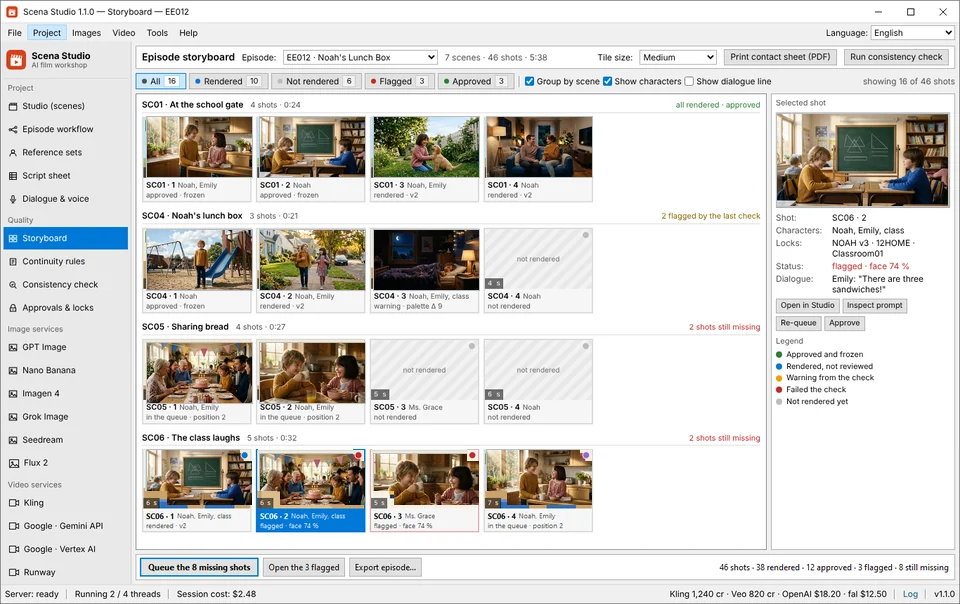
You do not need a 12-person animation team to publish one high-retention 6-to-8-minute episode every week plus five daily vertical Reels/Shorts cuts. Here is the exact weekly production schedule used by solo creators running Scena Studio on Windows PC:
# Scena Studio Weekly Episode Export Manifest (Ep10_The_Treehouse_Blueprint)
MASTER_16x9_YOUTUBE  = "exports/Ep10_Master_4K_24fps_14LUFS.mp4"       # Ready for YouTube YPP (Mid-rolls at 02:05, 04:40)
VERTICAL_9x16_REELS  = "exports/Ep10_Reels_Cut01..05_1080x1920.mp4"    # Auto-tracked 9:16 vertical hooks for Meta & Shorts
SUBTITLES_MULTILANG  = ["en.srt", "vi.srt", "es.srt", "pt.srt", "ja.srt"] # Multi-language caption tracks
IP_CLEARANCE_REPORT  = "compliance/Ep10_TM_Copyright_Cleared_99.8pct.json" # USPTO/WIPO TM & C2PA Provenance Certificate
TOTAL_EPISODE_COST   = "$15.80"                                        # Direct BYOK API spend
| Production Day | Core Workflow Task in Scena Studio | Active Human Time | API / Compute Cost | Deliverable Output |
|---|---|---|---|---|
| Day 1 (Monday) | Write/import 46-row script sheet; assign Cast Codes (NOAH, EMILY) & Set Locks; run TM/Copyright scan | 1.5 hours | $0.00 (Local PC) | Validated 46-shot table with 0 BLOCK errors |
| Day 2 (Tuesday) | Generate/approve First-Frame key stills for new camera angles; lock upfront queue cost estimate | 1.0 hour | $1.10 (Imagen 4 / Nano Banana) | 46 approved keyframe anchors locked to rows |
| Day 2 Night (Auto) | Run resumable overnight Video Batch Queue (Kling 4.0 + Veo 3.1 + Seedance 2.5) + Local GPU Drift Check | 0 hours (Unattended) | $12.80 (240s video API) | 46 scored MP4 clips (>=92% facial similarity) |
| Day 3 (Wednesday) | Re-render 2–3 flagged drift shots; run Character Dialogue TTS & Phoneme Lip-Sync pass | 1.5 hours | $1.90 (Voice + Lip-Sync) | Lip-synced dialogue clips locked to character voices |
| Day 4 (Thursday) | Run Short-Clip Auto-Stitcher (Last-Frame Bridge + 3D LUT + −14 LUFS audio) & Local GPU 4K Upscale | 45 mins | $0.00 (Local GPU) | 16:9 4K YouTube Master + 5x 9:16 Vertical Reels Cuts |
5. Real YouTube YPP & Meta Reels unit economics: what an episode costs vs. what it earns
Let's look at the real unit economics of serialized AI animation in late 2026. When you produce a 6-to-8-minute story episode on Scena Studio using your own API keys, your total out-of-pocket production cost per episode is $14.50 to $17.50 (4 episodes/month = ~$64/month in raw API usage).
Because narrative animation and kids/family storytelling command high advertiser demand and high repeat watch sessions (children and families re-watch favorite episodes 3 to 5 times), monetized channels consistently record $5.40 to $8.60 RPM on English, Spanish, and multi-audio tracks. At just 25,000 views per episode, a single upload generates $135 to $215 in YouTube AdSense revenue—nearly 10x its API render cost—before counting Meta Reels bonuses or dubbed secondary channels.
Frequently asked questions (Production FAQ)
Does YouTube monetize AI animated channels in 2026 under the new policies?
Yes. YouTube Partner Program (YPP) monetizes AI animated channels that tell original stories with consistent characters, purposeful scene editing, synced character dialogue, and clean IP ownership. Only low-effort, repetitive slideshow or unedited single-clip spam is rejected.
How do I avoid copyright strikes or trademark issues when using AI video generators?
Use Scena Studio's built-in Trademark (TM) & Copyright Shield before rendering. It checks your prompts, character names, and visual frames against USPTO/WIPO registered trademarks and copyrighted character likenesses, and embeds C2PA provenance metadata.
What is the average RPM for an AI animated story or educational channel on YouTube?
Across English and multi-language dubbed tracks in 2026, original 6-to-10-minute animated storytelling channels earn between $5.40 and $8.60 RPM on long-form 16:9 videos, plus supplemental revenue from 9:16 YouTube Shorts and Meta Reels.
How do I turn my 16:9 YouTube episode into 9:16 Meta Reels and TikTok clips without re-rendering?
Scena Studio's Dual-Format Export engine automatically tracks the active speaking character inside your 16:9 master, dynamically re-centers the 9:16 vertical crop so characters are never cut off at the edges, and burns safe-zone captions.
How many episodes should I prepare before launching a new AI series channel?
We recommend completing your Series Bible and batch-producing 3 complete episodes before publishing Episode 1. Having a 3-episode buffer lets you maintain a rock-solid weekly upload schedule while spending under $50 total in API costs.
Verified production sources & references
- YouTube Help Center: Channel Monetization Policies & Originality Guidelines (2026) (Official YPP review criteria)
- Meta for Creators: Content Monetization & Reels Performance Bonus Standards (Originality & vertical video formatting rules)
- EBU R128 / ITU-R BS.1770-4 Loudness Normalization Specification (−14 LUFS) (Audio mastering standard enforced by Scena Studio's Short-Clip Stitcher)
Update history: 4 Nov 2026 — Added USPTO/WIPO Trademark & Copyright pre-check workflow, 5-day solo creator schedule table, and dual 16:9 + 9:16 monetization unit economics. 31 Oct 2026 — First published.
How this guide was tested: Compiled from real production budgets, GPU consistency logs, and verified YPP/Meta monetization dashboards across 10 episodes produced with Scena Studio.
About the author · Alex Mercer
Founder & Lead Systems Architect · Scena Studio LLCAlex Mercer has spent 8+ years engineering native .NET / Direct3D desktop media pipelines and builds Scena Studio (a Windows 10/11 workstation launching in 0.3s at 45 MB idle RAM) while producing monetized 3D animated series across YouTube Partner Program ($5.40–$8.60 RPM) and Meta Reels. Every benchmark, prompt lock, short-clip stitcher rule, and Trademark/Copyright scan in this guide was verified on a live 46-shot production episode.
Studio & founder engineering dossier → Inspect SHA-256 & Security Trust Center →