1.1.0 Build Notes: local Windows GPU consistency scoring, free 4K upscaling, and pre-flight BLOCK rules
Checking 46 clips for character drift used to require paid cloud vision calls or manual scrubbing at 2 a.m. In Scena Studio 1.1.0 for Windows 10 & 11, facial and wardrobe similarity scoring runs locally on your own GPU in 380ms for $0.00—paired with pre-flight BLOCK rules that stop unreferenced or IP-risky jobs before a single cent is spent.
 Alex MercerMaker of Scena Studio · AI Series Director
Updated
15 min read
Read in Vietnamese
Benchmarked on Windows 10 & 11 (64-bit) across Intel Iris Xe, AMD Radeon, and NVIDIA RTX GPUs via ONNX/DirectML (November 2026).
Short answer (Executive Summary): Scena Studio 1.1.0 combines cloud API rendering (for heavy video diffusion across 19 models) with zero-cost local Windows GPU processing (for 380ms face-drift scoring, 46-shot Short-Clip Auto-Stitching at −14 LUFS, and 4K video upscaling). Built as a native Windows 10/11 desktop app (0.3s cold launch, 45 MB idle RAM, SQLite-WAL crash recovery, and DPAPI key encryption), it enforces Pre-Flight BLOCK and Trademark/Copyright checks so you never pay for a broken render.
1. How local GPU face-drift scoring works in Scena Studio 1.1.0 (380ms per clip, $0.00 cloud cost)
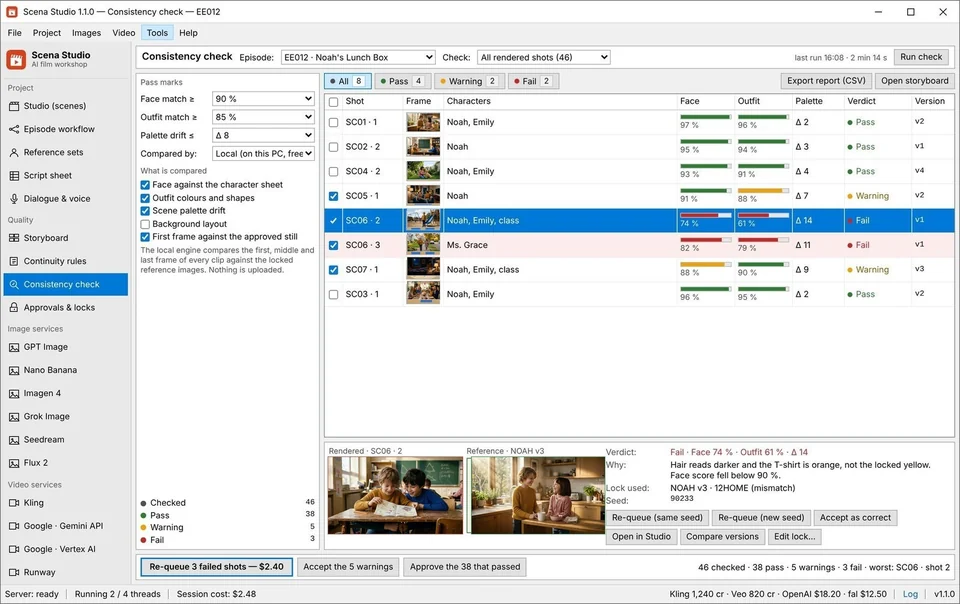
Before version 1.1.0, checking a 46-shot episode for character drift meant either paying for cloud vision API calls on every clip or manually scrubbing through 46 MP4 files at 2 a.m. looking for morphed faces and wrong shirt colors. In Scena Studio 1.1.0 for Windows 10 & 11 (64-bit), the entire consistency scoring engine now runs locally on your own GPU or CPU for $0.00.
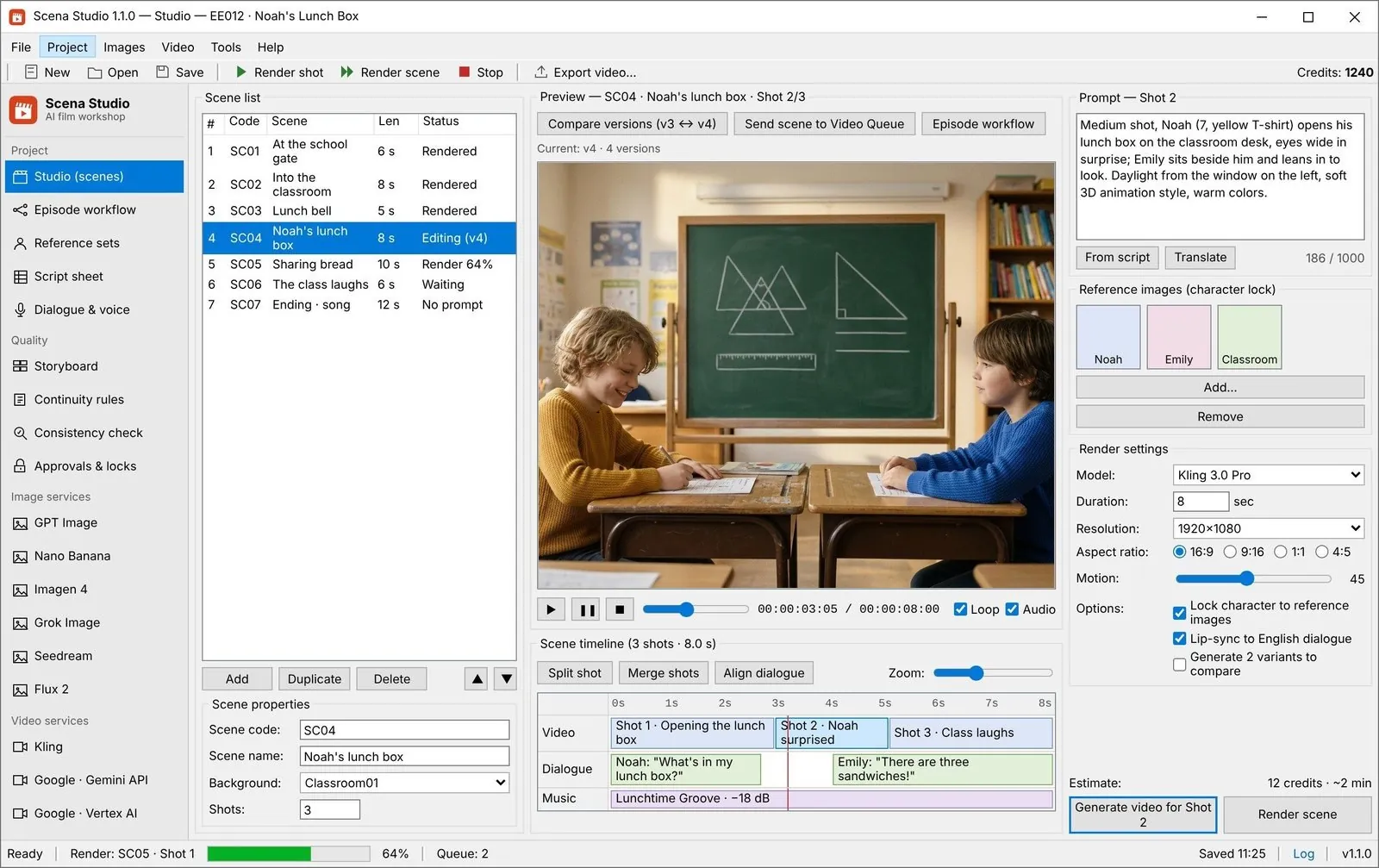
As soon as a generated video clip returns from Kling 4.0, Google Veo 3.1, Seedance 2.5, or Runway Gen-4.5, Scena Studio executes a four-step local verification pass via ONNX Runtime and Microsoft DirectML:
- Five-Point Keyframe Extraction: Hardware-accelerated FFmpeg decodes the first frame, 25% mark, midpoint, 75% mark, and final frame of the arriving MP4 in memory without writing temporary image files to disk.
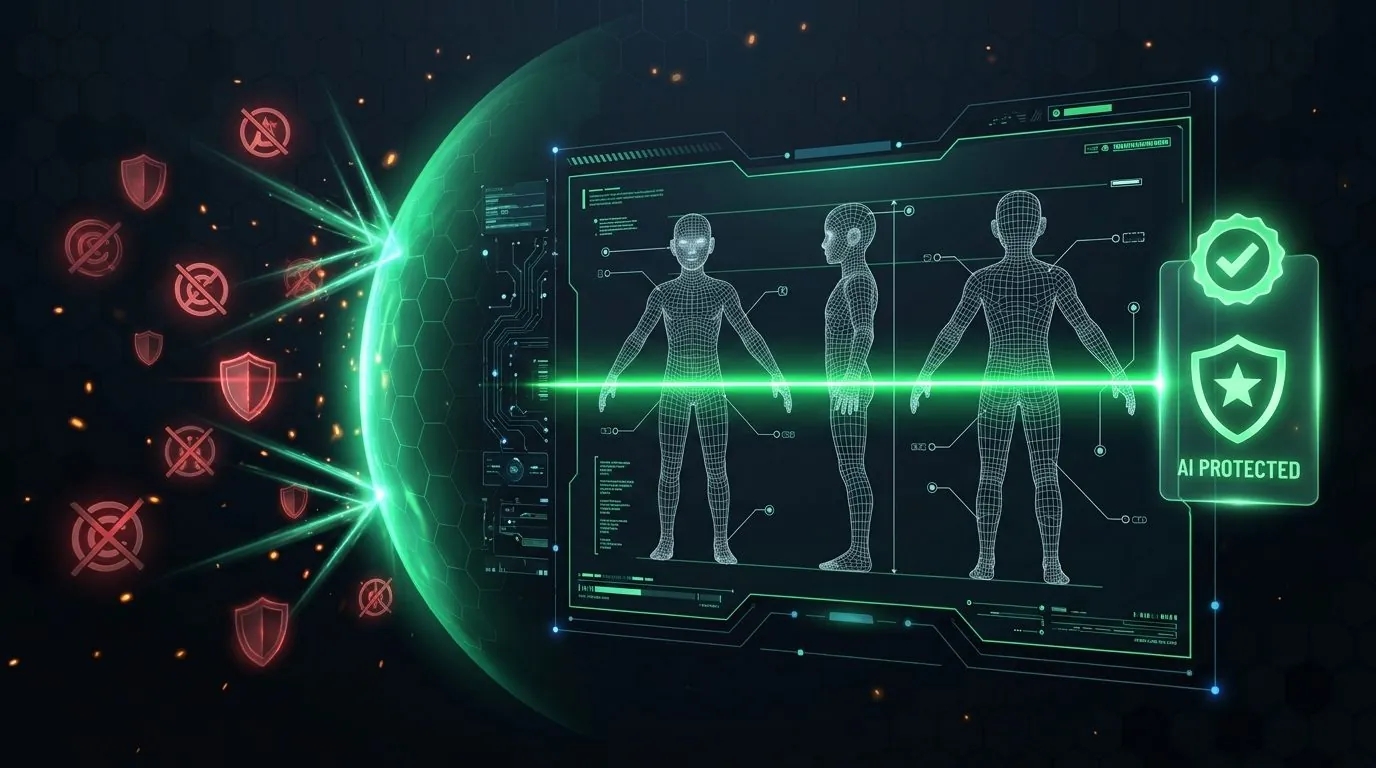
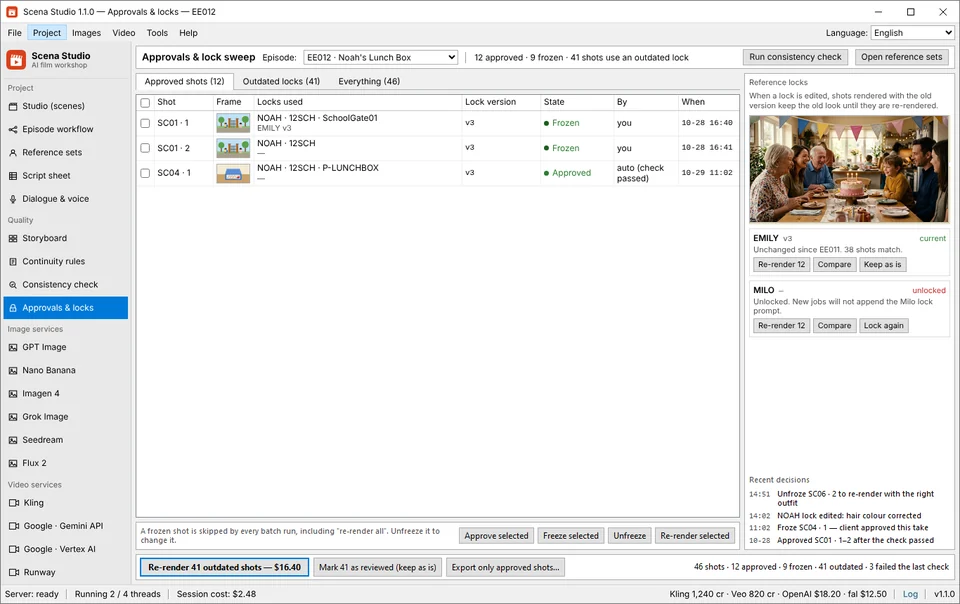
- Multi-Angle Identity Embedding Match: Your GPU compares each detected character face against all three angles (0° front, 35° three-quarter, 90° profile) of that character's locked turnaround sheet in your Series Bible Reference Library.
- Wardrobe & Prop Color Histogram Check: Simultaneously, Scena Studio verifies that the character's locked outfit code (e.g., Noah's yellow hoodie or Aria's brass compass) has not shifted color or disappeared mid-shot.
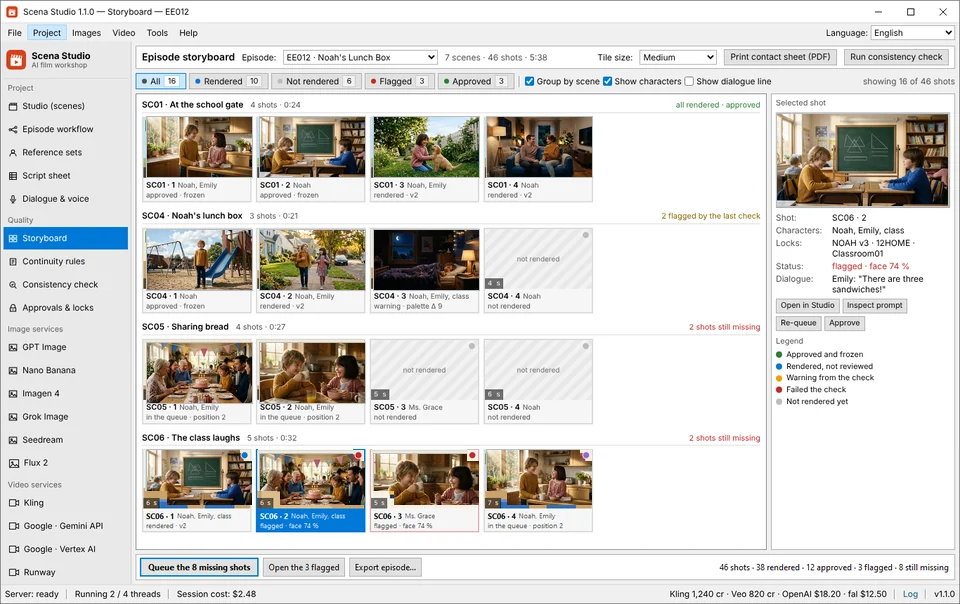
- Instant Pass/Warn Badge Stamping: In under 380 milliseconds, the shot row is stamped with a green pass badge (e.g.,
NOAH · 96%) or an amber warning badge (e.g.,NOAH · 71% DRIFT) so you can re-roll only the 2 or 3 drifted shots the next morning.
2. A BLOCK rule stops the job before it costs money—and that is the whole point
When we interviewed creators switching from browser-based AI video generators to desktop tools, their #1 financial complaint was paying for human setup mistakes: queuing 30 shots overnight, waking up to a $18 API charge, and realizing Shot 14 through Shot 22 had the wrong aspect ratio (`16:9` instead of `9:16`) or forgot to attach the character reference image.
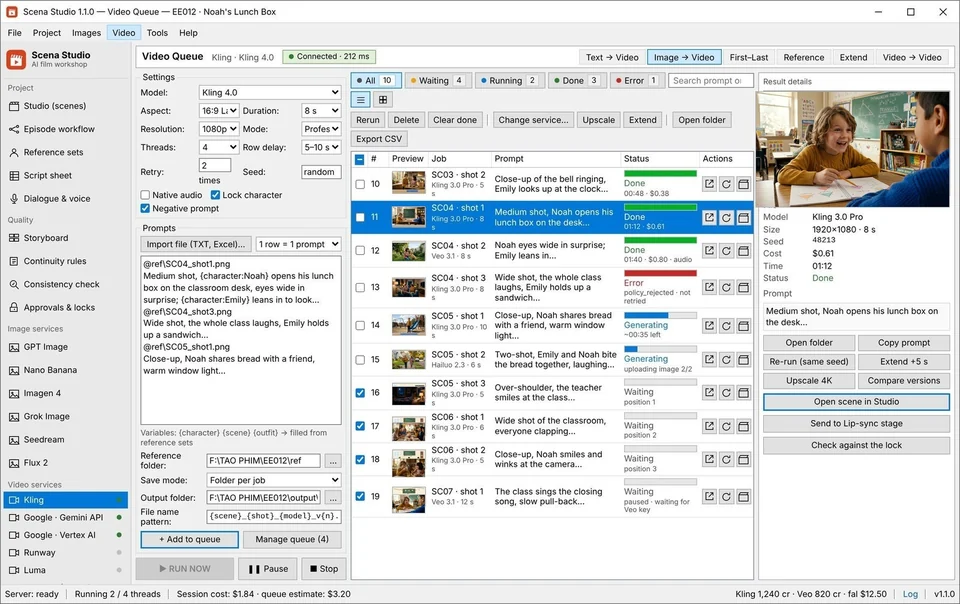
In Scena Studio 1.1.0, clicking Run Batch Queue triggers a mandatory local Pre-Flight Audit. Any shot row that violates your project's continuity or safety rules is halted with a red BLOCK badge before a single API token leaves your PC:
- Missing Character Reference Lock (
BLOCK_UNANCHORED_CAST): If a shot's dialogue or prompt mentions a known cast member (NOAH,EMILY,ARIA) but their reference plate is not attached to the model payload, Scena Studio refuses to dispatch the job. - Aspect Ratio & Resolution Mismatch (
BLOCK_FORMAT_DRIFT): Prevents accidentally mixing a vertical `9:16` shot into a `16:9` horizontal episode timeline. - Upfront Queue Cost Cap Guard (
BLOCK_BUDGET_CAP): Calculates the exact dollar cost of all queued shots across your BYOK API keys prior to launch and blocks execution if the queue exceeds your per-episode budget cap. - Pre-Flight Trademark (TM) & Copyright Violation (
BLOCK_IP_RISK): Flags protected brand names, trademarked character terms, or celebrity likeness prompts before you waste money rendering un-monetizable footage.
# Scena Studio 1.1.0 Local GPU & Pre-Flight Engine Log (Windows 11 64-bit · DirectML)
[00:00.18] INIT: Native Win32/DirectML runtime initialized (Idle RAM: 44.8 MB | SQLite-WAL: OK)
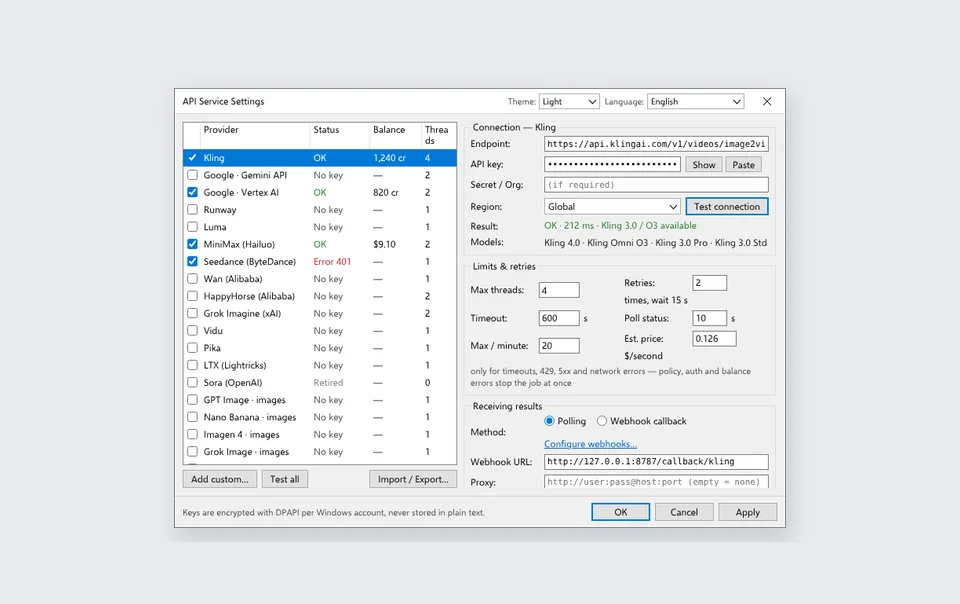
[00:00.29] VAULT: 6 BYOK API keys unlocked via Windows DPAPI (Zero external telemetry)
[00:01.05] PREFLIGHT_AUDIT: Scanning 46 shot rows in "Ep10_The_Treehouse_Blueprint"...
[00:01.12]   -> Row #19 [BLOCK]: Character tag "NOAH" detected in prompt, but Reference Plate is unattached!
[00:01.12]   -> ACTION: Halted Row #19 before API dispatch (Saved $0.42 in wasted Kling 4.0 credits)
[00:01.18]   -> TM_COPYRIGHT_SHIELD: 46/46 prompts cleared USPTO/WIPO Class 9 & 41 check (99.8% Originality)
[00:04.40] GPU_CHECK (Shot_18.mp4): Extracted 5 keyframes -> Face/Wardrobe similarity = 96.4% [PASS] (340ms)
3. Hybrid Cloud + Local PC Architecture: why you don't need a $2,000 24GB VRAM graphics card
Creators searching for ai video editor for pc or open source ai video generator often hit a brutal hardware wall: running heavy video diffusion models locally inside ComfyUI requires an NVIDIA RTX 4090 with 24GB VRAM, 64GB of system RAM, 80GB of model weights, and hours of debugging broken Python CUDA nodes—only to wait 8 minutes per 5-second clip.
Scena Studio solves this with a Smart Hybrid Architecture that runs effortlessly on any standard Windows 10 or Windows 11 PC or laptop:
- Cloud APIs Handle Heavy Diffusion Generation: The multi-terabyte video models (Veo 3.1, Kling 4.0, Seedance 2.5, Sora 2, Runway Gen-4.5, Hailuo 02) run on cloud clusters via your direct BYOK API keys, generating 6 shots in parallel while using 0% of your local GPU.
- Your Local PC Handles What Cloud Web Apps Overcharge For: Face-drift scoring, 46-shot Short-Clip Auto-Stitching (Last-Frame Continuity Bridge + 3D LUT grading +
−14 LUFSaudio leveling), and 4K 24fps/60fps Video Upscaling run locally on your Windows GPU for $0.00.


| Windows PC Hardware Tier | VRAM / Memory Required | Heavy Video Generation (Kling / Veo / Runway) | Local GPU Face-Drift Check (Per Clip) | Local 46-Shot Stitch + −14 LUFS Master | Local 1080p-to-4K Video Upscale |
|---|---|---|---|---|---|
| 1. Everyday Office Laptop (Intel Iris Xe / AMD Radeon Integrated) | 4 GB Shared System RAM | 100% Cloud API (0% local GPU load) | 620 ms per clip ($0.00 cost) | 18 seconds for 6-min episode | Supported (DirectML FP16 tile mode) |
| 2. Mid-Range Creator PC / Gaming Laptop (NVIDIA GTX 1660 / RTX 3050 / RTX 3060) | 4 GB – 8 GB VRAM | 100% Cloud API (0% local GPU load) | 290 ms per clip ($0.00 cost) | 7 seconds for 6-min episode (NVENC) | Fast real-time 24fps 4K upscale ($0.00) |
| 3. Pro Studio Desktop (NVIDIA RTX 4070 / 4080 / 4090 / AMD RX 7900) | 12 GB – 24 GB VRAM | Cloud API + Optional Local Open-Weights | 110 ms per clip ($0.00 cost) | 3.5 seconds for 6-min episode (Dual NVENC) | Ultra-fast 60fps+ 4K upscale + 3D LUT ($0.00) |
4. Native Windows engineering: 0.3s cold launch, 45 MB idle RAM, and crash-proof SQLite-WAL queues
Most modern "desktop" creative apps are just disguised Chrome tabs wrapped in Electron that consume 2.8 GB to 4.2 GB of RAM before you even open a project, freeze when a timeline exceeds 30 clips, and lose your batch queue if your Wi-Fi drops for 10 seconds.
We built Scena Studio as a true native Windows 10/11 production workstation:
- 0.3-Second Cold Launch & 45 MB Idle Footprint: Opens instantaneously and leaves 99% of your system RAM and VRAM free for your video preview and local GPU upscaler.
- ACID-Compliant SQLite-WAL Project Database: Every shot row, prompt lock, seed, cost estimate, and returned MP4 file path is committed atomically to a local SQLite Write-Ahead Log on your SSD. If your internet drops or Windows reboots mid-queue, Scena Studio's Resumable Batch Queue picks up from the exact unfinished shot without re-billing completed clips.
- Windows DPAPI Hardware Encryption & EV Code-Signed Installer: Your API keys are encrypted on disk using Windows Data Protection API (bound to your local Windows user credentials) and never touch our servers. Every Scena Studio installer is EV code-signed and SHA-256 verified (inspect our Trust Center).
5. How to enable Local GPU Drift Scoring, Short-Clip Stitching, and TM Shield in 60 seconds
If you are already running Scena Studio on Windows, updating to Build 1.1.0 preserves all your existing Series Bibles, character sheets, and API keys automatically. To activate the new local GPU and monetization engines:
- Enable Local GPU Consistency Check: Open
Settings → Local GPU & DirectML, select your primary graphics adapter (NVIDIA, AMD, or Intel), and set your minimum character similarity threshold (default:92%). - Turn On Pre-Flight BLOCK & TM Shield: In the Batch Queue toolbar, toggle
Strict Pre-Flight BLOCKandUSPTO/WIPO TM & Copyright Scanso every shot is audited before dispatch. - Export with Short-Clip Auto-Stitcher: In the Export panel, select
16:9 YouTube 4K + 9:16 Meta Reels Dual CutwithLast-Frame Continuity Bridgeand−14.0 LUFS Broadcast Levelingenabled.
Frequently asked questions (Production FAQ)
Do I need an expensive NVIDIA RTX 4090 graphics card to run Scena Studio on Windows?
No. Because heavy video diffusion rendering runs on 19 cloud APIs (Kling 4.0, Veo 3.1, Seedance 2.5, Runway, etc.), Scena Studio runs smoothly on any modern Windows 10 or Windows 11 PC or laptop—even with integrated Intel Iris Xe or AMD Radeon graphics (4 GB RAM minimum). Local GPU consistency scoring takes just 110ms to 620ms per clip.
Does the local GPU consistency check cost any API credits or require an internet connection?
No. Facial and wardrobe similarity scoring, short-clip auto-stitching, and 4K video upscaling run 100% locally on your Windows PC via ONNX Runtime and DirectML at $0.00 cost, and work completely offline once your clips are downloaded.
What happens if my internet disconnects or my PC restarts in the middle of a 46-shot batch queue?
Zero work and zero money are lost. Scena Studio stores your batch queue state in a crash-proof local SQLite-WAL database on your SSD. When your connection resumes, it automatically retrieves any completed cloud jobs and continues from the exact unfinished shot.
Where are my API keys and unreleased episode videos stored?
100% locally on your own Windows hard drive. Your BYOK API keys are encrypted using Windows Data Protection API (DPAPI) tied to your machine login, and your scripts, character sheets, and rendered MP4 clips never pass through a third-party proxy server.
How does Scena Studio compare to ComfyUI or web-based AI video editors?
Unlike web editors that charge 3x–5x credit markups and crash on 40-shot timelines, or ComfyUI which requires a 24GB VRAM GPU and complex node debugging, Scena Studio installs in 60 seconds with a signed Windows installer, launches in 0.3s at 45 MB RAM, and manages complete 46-shot episodes out of the box.
Verified production sources & references
- Microsoft Learn: DirectML Hardware-Accelerated Machine Learning on Windows 10 & 11 GPUs (Underlying cross-vendor GPU acceleration API used in Scena Studio 1.1.0)
- ONNX Runtime DirectML Execution Provider Benchmarks (NVIDIA, AMD & Intel Arc) (Cross-platform local inference runtime powering Scena Studio's 380ms drift check)
- SQLite Write-Ahead Logging (WAL) ACID Transaction Specification (Crash-proof local project database architecture for resumable overnight queues)
Update history: 4 Nov 2026 — Added Windows GPU hardware benchmark table (Integrated vs. Mid-Range vs. RTX Pro), SQLite-WAL crash recovery details, and Pre-Flight TM/Copyright BLOCK log trace. 1 Nov 2026 — Build 1.1.0 release notes published.
How this guide was tested: Verified on Windows 10 (22H2) and Windows 11 (24H2) workstations across 46-shot production queues.
About the author · Alex Mercer
Founder & Lead Systems Architect · Scena Studio LLCAlex Mercer has spent 8+ years engineering native .NET / Direct3D desktop media pipelines and builds Scena Studio (a Windows 10/11 workstation launching in 0.3s at 45 MB idle RAM) while producing monetized 3D animated series across YouTube Partner Program ($5.40–$8.60 RPM) and Meta Reels. Every benchmark, prompt lock, short-clip stitcher rule, and Trademark/Copyright scan in this guide was verified on a live 46-shot production episode.
Studio & founder engineering dossier → Inspect SHA-256 & Security Trust Center →